The way we network for business is changing. Carrying lots of paper visiting cards is inconvenient. Searching through a wallet to locate contact details is antiquated. With the ease of electronically sharing business information, many professionals and business owners are adopting digital solutions.
If you want to have a digital business card for your business, you do not need to have graphic design or software development skills. You can build an online profile and add your contact details in little to no time.
A digital card allows customers to save your information, visit your site, follow you on your socials and contact you to do business.
In this article, we will show you how to create your own digital card, what details you should add to it, and how Tapect can help you with networking.
What Is a Digital Business Card?
A digital business card is an online version of a paper business card. Instead of carrying hundreds of paper cards with you, you can share your info electronically. With a card, your potential clients can save your info on their devices, visit your site and/or follow you on your socials.
What You Can Include When Creating a Digital Business Card:
– First and last name and job title
– Company name and logo
– All your phone numbers and email addresses
– Your office and business locations
– Your website and social media links
– Your products and services
– A picture of yourself and/or an introductory message
By creating a digital business card you give your customers a quick and easy way to get in touch with you.
Why Should You Create a Digital Business Card for Your Business?
A good first impression is vital to your business. Meeting new customers, clients, or business partners warrants the immediate sharing of your contact details.
Here are some advantages of digital cards.
1. Easy to Share Contact Details
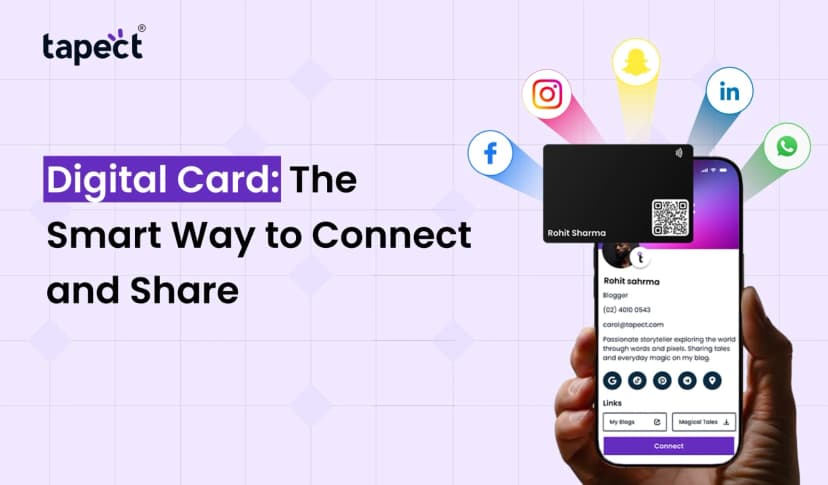
With digital cards, you can post your contact details via social media or email, or share them via QR code, WhatsApp, or any other app.
2. Save Money on Printing Cards
Digital cards eliminate the need to print new cards when your contact details change, or cards become outdated.
3. Easily Change Your Contact Details
You can easily edit your contact details to be in line with your current business details.
4. Create a Professional Image
Adding your business details and brand elements helps build your professional image and creates a lasting impression.
5. Better for the Environment
Business cards made digitally don’t require paper to be printed, making them more eco-friendly. If a company wishes to reduce their paper waste, digital cards are one way to accomplish that.
How to Create Digital Business Card in Easy Steps
Anyone can create a digital business card, even without any design skills. Here is how you do it.
Step 1: Choose the Easy Card Creation Platform
The most important aspect of a card creation platform is how easy it is to create cards. The platform should let you add your contact details, socials, links, and website with a QR code.
If you don’t want to waste hours learning design, find a platform with preset designs and easy to use editing tools.
If you own a business and want to easily create cards for your employees, then Tapect is the answer.
Step 2: Enter Your Details
After choosing your card creation platform, it’s time to add your details.
Be sure to keep things simple and legible. Add your name, the company you work for and your title, your contact number and email address, your website, and socials.
If you’re a business owner, you can add a short description about your services.
Step 3: Professionally Design Your Card
Choose a design that is in line with your business. Use colors, fonts, and a layout that is clean and professional.
When you make business cards online, use simple colors and a simple layout. This makes it easy for visitors to locate your contact information.
A great design has:
-A clear company logo or profile picture
– Easily readable text
– Brand colors
– Contact Information that is neatly arranged
– Relevant website and social media links
Step 4: Add your social media profiles
Most businesses use social media to connect with clients. Link your business pages to give clients more info about your business.
You can use:
– Your business Instagram page to post stories, videos and pictures.
– Facebook to post your business info
– Your business LinkedIn page
– A Youtube channel with product videos
When you make business cards online, you give visitors a chance to connect with your business via the social media sites of their choice.
Step 5: Add a QR Code
An easy way to share your contact details is to use a QR code. You can print the code on your business cards, traditional visiting cards, product packaging or brochures. This also makes sharing contact info easy during business meet and greets, customer visits and exhibitions.
Step 6: Connect an NFC card
NFC cards use the same concept as QR codes but use a different technology to share digital data. This makes networking easy, quick and convenient.
Combining the best of an online and offline business card, Tapect NFC business cards let you carry your business cards digitally while including a link to your online profile.
Step 7: Review and Share Your Card
Review your profile thoroughly before sharing it. Check if your contact details are correct. Test all links. Scan the QR code.
Are you all set? It is time to share your card with clients, colleagues, business partners and potential customers.
With the right details and design, the digital business cards can eliminate inconvenience during face to face meetings.
Important Features to Look for in a Digital Business Card
Choose a service that has all the features you are looking for.
Here are some useful features to look for:
– Custom design: A platform that allows you to customize your card to your company’s design standards.
– Contact Saving: A card that lets users save your contact details automatically to their devices.
– QR Code Sharing: A profile that is accessible via QR code.
– NFC Technology: A profile that is accessible via a simple tap.
– Social Media Links: A card that has direct links to your social media pages.
– Editing: A card that allows you to edit your details.
– Mobile Friendly: A card that is easily viewable on a mobile device.
These features can help simplify the creation process of a digital card.
How Tapect Helps You Create a Digital Business Card
Tapect helps freelancers, entrepreneurs, and companies easily share their contact details digitally.
Whether you are an individual or part of a larger team, Tapect offers various options to fulfill your digital networking needs.
Tapect allows you to:
– Construct a digital business profile
– Easily share your info via QR code
– Connect via NFC card
– Include your website/social handles
– Instantly share your contact info with a tap
– Easily give your customers/clients a way to reach you
Aside from the cards, Tapect offers other NFC products that enhance physical networking with digital communication.
Building digital business cards for yourself and your employees is easy with Tapect.
Tips to Improve Your Digital Business Card
– Add a professional, clear photo.
– Include your latest contact info.
– Keep your introductory line short.
– Use your company’s colors and logo.
– Only include active social media links.
– Be sure to include a working website link.
– Easily accessible contact information.
– Test your QR codes before using them.
It is best practice to design Digital Business Cards with tidy organization and concise information so your visitors don’t waste time trying to figure out your message.
Frequently Asked Questions (FAQs)
1. How can I make a digital business card for free?
You can use online resources that provide card creation tools. Just add your name, contact details, company info, and your preferred social media handles. Check first which free options a service provides.
2. Is a digital business card better than a paper visiting card?
Digital cards are easier to share and update. Plus you can include social media, web links and more. Paper cards still work for in-person meetings. Use both as you see fit.
3. Can I make a digital business card from my phone?
Yes. Just use your phone to create and share your digital card. Many services have mobile-friendly pages.
4. What is an NFC business card?
An NFC business card utilizes wireless technology to share your profile with a compatible phone by touching the card to the phone.
5. Can I modify my details after creating the card?
Yes, of course. Especially if the service allows profile modifications, you can edit your contact details and other info without needing to create a new card.
6. Why should I choose Tapect?
Tapect provides digital profiles and NFC cards to help people in business and/or profession to interact with their customers. They use QR codes and NFC cards.
Conclusion
Customers are the most valuable asset for a business. For professional and business growth, it is important for a business to make ways to interact with the customers and build relationships. Digital cards help professionals/business owners to share their contact info digitally. It eliminates the use of printed cards, and helps them to edit their card details any time.
Advanced graphic design skills are not needed to have your digital card. Pick a platform, add your details, and choose a design you like. It is that simple.
If you are in business and/or profession, and are interested to Create Digital Business Card, Tapect is the right company to take your business to next level networking. A digital profile helps sales persons, entrepreneurs, and business owners to interact with new connections effortlessly.
Create Digital Business Card with Tapect and start effortless and easy networking today!
If you are interested in digital business cards and NFC cards, check Tapect for more info.
Tapect simplifies the way business owners share their details. Visit them for more info.
 05 Nov 2026
 business