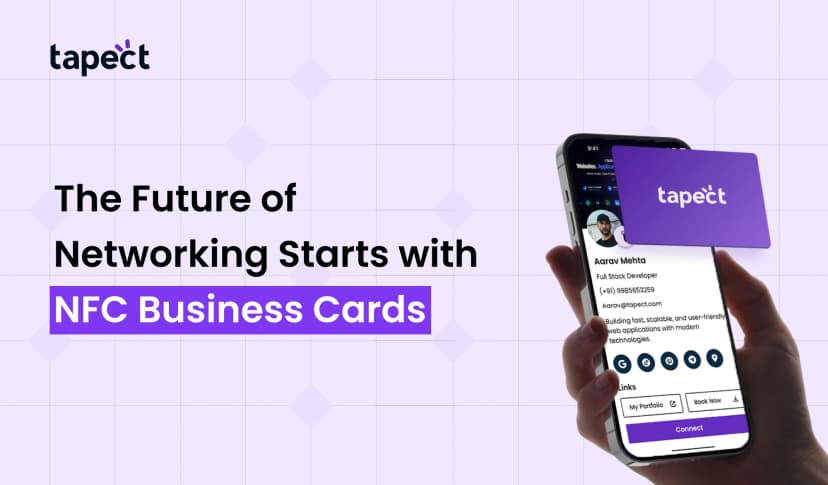
People desire quick ways to give out their contact information. People lose paper cards. Phones change. Links stop working. These problems can be fixed with an NFC business card from Tapect. Your information opens on any smartphone with just one tap. You appear current, save time, and are still easy to access. When someone taps your NFC business card they may see your name, phone number, email address, website, social media connections, and more all in one place.
A lot of people also call this kind of card a smart business card or a digital business card. It looks like a regular card that you may give to someone, yet it operates like an electronic business card. You may connect Tapect to business cards online so that your information is always up to date.
What Is an NFC Business Card?
Inside an NFC business card is a little chip. That chip has a link to your Tapect profile or contact page on it. When someone taps the card on their phone, it opens the link. In most circumstances, you don’t need an app. The chip accomplishes the job.
It’s like an electronic business card that you can put in a regular card. Your Tapect profile links to business cards online, so your information is always available. When you change your phone number, you only have to update the page once, and every new tap will show the updated information.
Why Use an NFC Business Card?
Sharing is easy and smooth with a nfc business card from Tapect. It also makes you look like you’re ready for technology.
Key benefits
- Sharing right away
People Tap and obtain your information right away.
- No piles of paper
Less trash. No cards that are lost.
- Updates are easy
You can change your information at any time in Tapect.
- Look professional
You are different from everyone else during meetings and gatherings.
Tapect is essentially a modern digital business card service. Your card is like a smart business card in your pocket that is connected to business cards online so that nothing goes out of date. With just one tap, an electronic business card preserves your brand in one place and helps consumers save you.
Why Sharing Right Away Is Important
In business, speed is important. People want to be able to get to your information quickly when they meet you. A Tapect NFC business card makes things easier. They tap, save, and move on instead of entering in your number. That little change can make short conversations become real leads.
How to Make Your NFC Business Card with Tapect
You can make your card in Tapect one step at a time. It’s simple.
1. Set up your Tapect profile
Make your link work in Tapect. This is the most important part of your NFC business card. You have full control over it, and it operates like a live digital business card. You may also make business cards immediately on the platform.
2. Make a plan for your content
Choose which new contacts should see first. Include your name, job title, phone number, email address, website, and one or two social media connections. Make it short and neat. Use it like a smart business card that tells folks what to do next.
Your Tapect page is like an electronic business card, so make sure the colours and style match. Online tools for business cards keep everything up to date.
3. Make your card seem good
Keep the layout simple. Famous name. Logo that is easy to read. One main thing to do. Your NFC business card should still look like your brand. Leave some room so it looks neat.
4. Set up the chip
Tapect connects the chip to your page. You write the link to the card, and now your NFC business card works right away. It only takes a few seconds.
5. Share and test
Try your NFC business card on a few different phones. Look at the link. Make sure everything is clear. Use it at gatherings, meetings, and stores once it works.
Design Tips to Make Your Card Stand Out
A good NFC business card is easy to read and understand:
- Use colours that are really different from each other.
- Make sure fonts are easy to read.
- Show one main thing to do
- Add a small QR code as a backup.
- Make the link short.
You may manufacture business cards online with Tapect and make sure that your print and digital styles match. Once your design is done, you may also order business cards online.
Where NFC business cards work best
You can use your NFC business card anywhere:
- Exhibitions
- Meetings
- Meetings with clients
- Visits for sales
- Pop-ups
- Events for networking
You can also put a Tapect card on your counter so that consumers can tap it and save your information. They will still be connected even if you run out of time. This goes nicely with ordering business cards online and keeping some on hand.
NFC vs. Regular Business Cards
You can only read paper cards once. An NFC business card is always online. You may add connections to booking pages, movies, maps, and more using Tapect. You can keep track of taps and change information at any moment without having to print again.
1. Do I need a special phone?
Most new phones can scan an NFC business card without an app. When they press at the top of the phone, the link opens.
2. Is it safe?
Yes. Tapect keeps your information on a safe page. The card only has a link on it. When someone taps your NFC business card, you choose what they see.
3. Can I change it later?
Yes. You may change your Tapect page at any moment. When they tap your NFC business card, they get the new information.
4. Is it possible for one card to work everywhere?
Yes. You can use one Tapect card for meetings, shows, and trips. It works as an electronic business card that can be changed.
conclusion
With a Tapect NFC business card, sharing is quick, easy, and up-to-date. It has the look and feel of a real card, but it works like the web. You are in charge of your profile. You may change it in seconds. It’s easy for anyone to save your information.
Begin with Tapect. Make your profile, create your card, connect the chip, and try it out. You may generate business cards online, maintain them up to date, and make actual relationships. If you set it up correctly, your NFC business card will be a simple tool that helps every new discussion progress ahead.
 5/20/2026
 business